


When a LaCie Rugged Mini external hard drive fails, the impact is often immediate and disruptive. Known for their durability, these drives are frequently used by professionals to store critical project files and backups.
However, even the most resilient hardware can succumb to internal component failure.
This case study details how PITS Data Recovery addressed a severe controller failure to restore inaccessible data for a client.
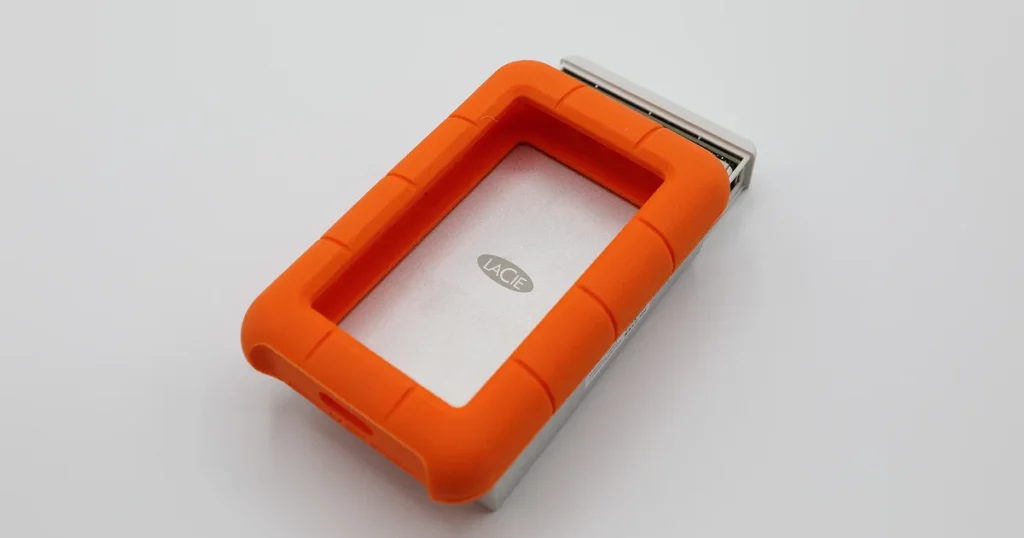
Client Profile: High-Stakes Data Loss
The client, a freelance creative professional based in California, relied on a LaCie Rugged Mini to store several years of high-resolution portfolio assets and active client projects.
While working on a deadline, the drive suddenly became unresponsive. For an independent professional, this level of data loss represents more than just a technical glitch; it is a direct threat to business continuity and professional reputation.
Industry-Leading 99% Success Rate
No hidden fees. No surprises. Just expert data recovery you can trust. We handle everything from simple file loss to extreme data recovery cases. If we can’t recover your data, no one can.
The Failure Symptom: A Drive That Won’t Mount
The primary symptom in this case was a total lack of detection. When the drive was connected via USB, the operating system failed to recognize the device.
There were no usual indicators of activity, such as the mounting of a volume or access to the file system. The drive appeared “dead” to the computer, making standard software-based recovery attempts impossible.
To understand more about why these symptoms occur and what they mean for your hardware, learn more about why a LaCie hard drive might not show up here.
When a device fails to initialize at the hardware level, specialized laboratory equipment is required to regain access.
You can read more about LaCie external hard drives not being recognized to see how these symptoms relate to hardware failure.

Engineering Analysis: Identifying PCB and Controller Failure
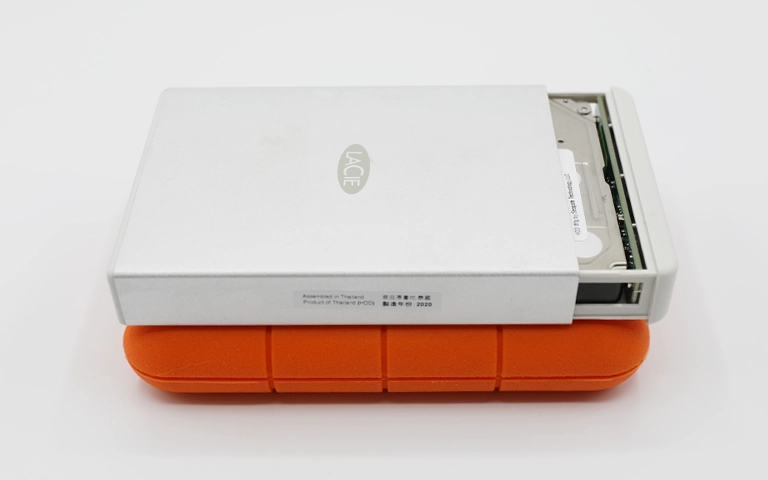
Upon arrival at our specialized laboratory, PITS engineers performed a comprehensive hardware diagnostic. The evaluation confirmed that the drive’s internal mechanical components were healthy, but the Printed Circuit Board (PCB) had suffered a controller failure.
The controller is the “brain” of the drive, managing the flow of data between the computer and the storage platters. Without a functional PCB, the drive cannot initialize.
If your drive is making unusual noises during this phase, you should read more about the causes of LaCie hard drive beeping before attempting further power cycles.
Modern LaCie drives contain unique firmware (ROM) on the controller board. Replacing a failed PCB with a “matching” board from the internet without transferring the ROM data can lead to permanent data loss or drive encryption lockouts.
The PITS Solution: ROM Transfer and Sector-by-Sector Imaging
Recovery required a multi-stage hardware intervention. Since the original PCB was beyond repair, our team sourced an exact match donor board from our inventory.
The most critical step was the ROM transfer. Our engineers desoldered the original ROM chip containing the drive’s unique adaptive parameters and moved it to the donor PCB.
This allowed the drive to “recognize” itself and boot correctly. Once the hardware was stabilized, we moved the drive to a controlled imaging station to perform a sector-by-sector extraction, ensuring no further stress was placed on the aging hardware.

Your Data Security Is Our Priority
Data privacy isn’t optional. It’s our commitment. Our secure recovery process ensures your sensitive information stays protected from start to finish.
HIPAA Compliant
GDPR Compliant
Secure Facility
NDA Available
Trust in certified security. Start your recovery today! Call Now: 888.611.0737
The Results: Critical Files Successfully Restored
By bypassing the failed controller and stabilizing the firmware, PITS Data Recovery successfully extracted the entire file structure.
The client’s portfolio assets and active project files were validated for integrity and transferred to a new, secure storage device. The client was able to resume work without losing a single project file.
For more insights into how these complex recoveries are managed, you can read more about a similar successful LaCie Rugged recovery here.
Don't Let Data Loss Ruin Your Business
Minimize business disruption. We retrieve lost data fast, so you can focus on what matters.
Why Expert Handling is Vital for LaCie Rugged Drives
LaCie Rugged drives are designed for portability, but their internal architecture remains complex. When the external bridge or the internal controller fails, the data remains trapped behind a hardware barrier.
Attempting to force the drive to mount or using “home remedies” often leads to physical head crashes or platter damage.
Professional recovery ensures that the hardware is handled in a static-free, controlled environment using tools designed specifically for firmware manipulation.
| Feature | Simple PCB Swap (DIY) | Professional ROM Transfer (PITS) |
|---|---|---|
| Compatibility | Low (Firmware mismatch) | High (Unique data moved) |
| Risk | High (Potential chip damage) | Controlled (Lab environment) |
| Success Rate | Very low on modern drives | High for controller failures |
| Data Integrity | Unpredictable | Sector-by-sector extraction |


DIY Recovery
Risks permanent data loss
Let the Specialists Handle It
DIY attempts often result in permanent data loss. Our certified recovery specialists use advanced tools in controlled environments for the highest success rate.

24/7 Emergency Service
Final Takeaway and Next Steps
When a hard drive fails to appear, especially after signs of overheating or hardware damage, the situation often involves more than a simple connection issue. Acting quickly and avoiding further attempts can preserve recoverability.
If you are dealing with a similar issue, such as a Samsung hard drive not being detected or suspected PCB damage, the next step is a professional evaluation.
Speak with a recovery specialist or request an evaluation to understand your options before further action is taken. Early intervention can significantly improve the chances of retrieving critical data while minimizing additional risk.
Frequently Asked Questions
Can I just buy the same model drive and swap the green circuit board?
Why was my drive not recognized even though the light was on?
What causes a PCB or controller to fail suddenly?
My LaCie drive light is blinking but not showing up on my Mac or PC. Is it dead?
Get a Free Consultation.
Our recovery experts are ready to assess your device and guide you through the safest path to recovery. Fill out the form to get started.
"*" indicates required fields